User-centered design (UCD) is an iterative design process that puts the people who will actually use a product at the center of every decision. Instead of designing around assumptions, teams research real user needs, involve users at each stage, and refine the design until it genuinely works for them.
The term goes back to 1986, when cognitive scientist Don Norman introduced it in his work on user experience. Four decades later, UCD is the backbone of the products, apps, and services people reach for every day, and it is often the difference between software that feels effortless and software people quietly abandon.
This guide breaks down what user-centered design is, how it differs from related approaches, the five core principles, the five-stage process, why it matters for your business, and what it looks like in practice, including how AI is reshaping the work.
- What is user-centered design?
- UCD vs. human-centered design vs. design thinking
- The 5 principles of user-centered design
- The user-centered design process
- Why user-centered design matters
- User-centered design examples
- User-centered design in the age of AI
- Frequently asked questions
What is user-centered design?
User-centered design is a design philosophy and process where the needs, behaviors, and limitations of end users drive every decision. Designers study how real people think and act, involve them throughout the project, and validate the work against user needs rather than internal opinion or aesthetic preference.
According to Don Norman, who coined the term:
User-centered design means starting with a good understanding of people and the needs that the design is intended to meet.
In practice, UCD sits inside the broader design thinking methodology. It solves user problems by prioritizing user needs above all else, and it relies on empathy and close observation of how people interact with products and their environments. The Interaction Design Foundation defines it as an iterative design process in which designers focus on users and their needs in each phase, involving them at every stage to create genuinely accessible products.
User-centered design vs. human-centered design vs. design thinking
User-centered design focuses specifically on the end users of a product and their goals. Human-centered design is broader and considers everyone affected by a solution, including communities and people who never touch the product directly. Design thinking is the wider problem-solving mindset that both sit inside. Of the three, UCD is the most product- and interface-focused.
- User-centered design optimizes a specific product or interface around its direct users. This is also what people mean by user-centric or customer-centered design.
- Human-centered design zooms out to all stakeholders and the human context around a problem, which matters for services, policy, and social impact work.
- Design thinking is the overarching empathize, define, ideate, prototype, and test mindset. User-centered design is how you apply that mindset to a product.
The 5 principles of user-centered design
The five principles of user-centered design are: design around real user needs, involve users early and often, design to prevent errors, give clear and timely feedback, and reduce the user's mental effort. Together they keep the focus on usability over assumptions at every stage.
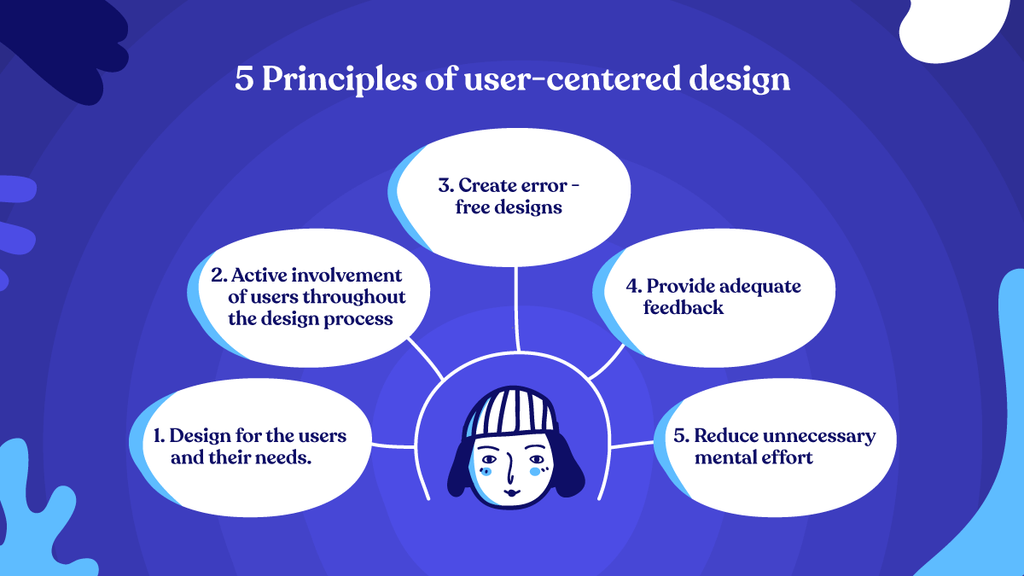
- Design for the users and their needs. Ask who the users are, what their problems are, and what their goals are. A clear understanding of user needs and task requirements is the driving force behind every successful design.
- Involve users early and actively. Bring users into the process from the first stage, and base design decisions on what works for them to avoid expensive rework later.
- Design to prevent errors. Guide users along the right path so mistakes are hard to make, and watch real people use the design to confirm they can reach their goals without confusion.
- Provide clear feedback. Users feel unsure when a system goes quiet. A task in progress should show its state so people stay confident and on track.
- Reduce unnecessary mental effort. Complicated interactions frustrate people. Keep first-time guidance available and remove friction so users spend their attention on the task, not the interface.
The user-centered design process
The user-centered design process runs in five iterative stages: understand the context of use, specify user and business requirements, design solutions, evaluate them against those requirements, and iterate. Informed by the ISO 9241-210 standard, teams loop through these stages until the design genuinely meets user needs.
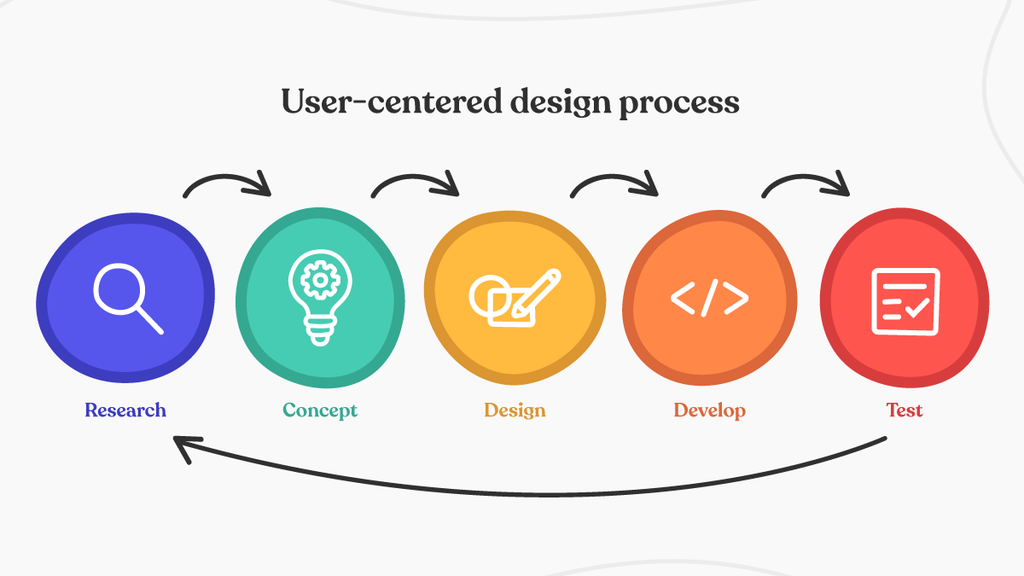
- Research: understand the context of use
- Concept: specify user and business requirements
- Design: create solutions
- Develop: evaluate against requirements
- Test: iterate
1. Understand the context of use
Design teams research the target user, their environment, pain points, and goals. Interviews, field observation, and analytics give a broad understanding of what users are trying to achieve and how they would like to get there.
2. Specify user and business requirements
With the context understood, teams define what the design must achieve for both the business and the end user. The goal is a set of solid, specific requirements that later decisions can be measured against.
3. Create solutions
This is the stage designers know best. Sitemaps, wireframes, user journeys, and prototypes take the work from a rough concept to a complete, testable design.
4. Evaluate against requirements
Teams put the design in front of real users through usability testing and check it against the requirements set earlier. The point is to see the product through the user's eyes, not the designer's.
5. Iterate
Insights from evaluation feed back into the loop. Teams refine, fix, and re-test, repeating the cycle until the design holds up against real user needs. Iteration is what separates user-centered design from a one-shot guess.
Why user-centered design matters
User-centered design matters because it lowers the risk of building the wrong thing. Products shaped by real user input convert better, generate fewer support tickets, and waste less budget on rework. Design-led companies consistently outgrow their peers, and good UX returns far more than it costs.
Forrester has found that every dollar invested in UX can return up to 100 dollars, an ROI of around 9,900%. McKinsey's research on the business value of design found that the most design-led companies grew revenue and total shareholder returns at roughly twice the rate of their industry peers.
The downside of skipping it is just as well documented. With global IT spending now past 5 trillion dollars a year, a meaningful share of software projects still fail or overrun. The usual culprits are familiar:
- Badly defined requirements
- Shifting project objectives
- Poor communication between developers, customers, and stakeholders
- Wrong estimates
- Weak user testing
User-centered design attacks exactly these failure points. It surfaces the real requirements early and validates them with users before the expensive build, so problems get caught when they are cheap to fix. The gains can also be measured. Common KPIs teams use to track the ROI of user-centered design include:
- Conversion rate
- Increase in referrals
- Increase in page views
- Average sales per visitor
- Decrease in drop-off
- Decrease in support calls
- Percentage of positive feedback
- Reduction in redevelopment and maintenance costs
User-centered design examples
Some of the clearest examples of user-centered design are products that quietly removed friction people had learned to tolerate. In each case, watching real users changed what got built.
Oral-B and IDEO's kids' toothbrush
In 1996, Oral-B asked the IDEO design team to solve a stubborn problem: kids hated brushing their teeth and needed to be motivated. The common assumption was that a kid's toothbrush should be small, because kids are small. Observation told a different story. Kids lacked the finger dexterity adults have, so they gripped the brush in their fists rather than their fingers.
IDEO designed the Gripper, a toothbrush with a fatter, squishier handle that fit a child's fist, plus a rubber grip and fun characters to make brushing appealing. Most kids' toothbrushes still look like it today, and it became one of the best-selling kids' toothbrushes in the world. That is user-centered design: the insight came from watching users, not from assumptions.
Duolingo's habit-forming lesson design
Duolingo obsessively studies how learners actually behave, including when they drop off and what brings them back. Streaks, bite-sized lessons, and gentle reminders exist because the data showed that motivation, not content, was the real user problem. By designing around that behavior, Duolingo became one of the most-used learning apps in the world. The lesson plan is good; the retention design is what makes people return.
User-centered design in the age of AI
AI is changing how user-centered design gets done, not what it is for. Teams now use AI to synthesize research faster, generate more design directions, and prototype in hours instead of weeks. The human job stays the same: deciding which user needs matter and judging whether a solution actually serves them.
Used well, AI widens the search for possibilities and clears away the slow parts of production. It can cluster hundreds of interview notes, draft variations of a flow, or stand up a clickable prototype for testing before lunch. What it cannot do is care about the user. Empathy, taste, and the call on what is worth building still come from people. The studios that win with AI treat it as an amplifier of craft, not a replacement for judgment, and they keep validating with real users at every step.
Frequently Asked Questions
What is user-centered design in simple terms?
User-centered design means building a product around the people who will use it. You research their needs, involve them throughout the project, and keep refining until the product is genuinely easy and useful for them, rather than designing around guesses or internal preferences.
What is the difference between user-centered design and human-centered design?
User-centered design focuses on the direct users of a specific product and their goals. Human-centered design is broader and considers everyone affected by a solution, including communities and people who never use the product directly. UCD is essentially human-centered design applied tightly to a product or interface.
What are the five stages of the user-centered design process?
The five stages are: understand the context of use, specify user and business requirements, design solutions, evaluate those solutions against the requirements, and iterate. Teams repeat the loop until the design meets user needs.
Why is user-centered design important for business?
User-centered design lowers the risk of building the wrong product. It improves conversion, reduces support and rework costs, and leads to products people actually adopt. Research from Forrester and McKinsey links strong UX and design-led cultures to significantly higher returns.
Putting user-centered design to work
User-centered design is less a checklist than a habit. Stay close to the people you are designing for, involve them early, and let evidence settle the arguments that opinion cannot. Teams that work this way ship products that feel obvious in hindsight, which is the highest compliment a design can earn.
At WowMakers, we have spent 15 years building products and brands this way, now with AI-amplified workflows that let us research and prototype faster without trading craft. If you are building something your users should love from the first session, take a look at our UI/UX design work.