Open almost any website and your eyes already know where to go. The logo sits top-left, the menu runs across the top, a big headline greets you, and the small print waits at the bottom. That predictability is not an accident. It is the anatomy of a website, the shared layout pattern that good sites follow so visitors never have to relearn how to use the web.
Understanding the parts of a website helps you read any page like a designer. You start to see why elements sit where they do, what each region is for, and how they guide someone from a first glance to a click. Whether you are briefing a redesign, studying UX, or building your first site, the same map applies.
This guide walks through the visual structure first: the five main parts every page shares, the supporting UI elements that fill them, and a quick look under the hood at how a site is actually built. By the end, you will have a working mental model of how a web page fits together.
What Is the Anatomy of a Website?
The anatomy of a website is the standard set of structural parts that make up a typical web page, arranged from top to bottom so visitors can navigate by instinct. A typical page has about five main parts: the header and navigation, the hero section above the fold, the main content body, an optional sidebar, and the footer.
Each part holds smaller supporting elements, such as the logo, menus, buttons, forms, and links. Together these parts and elements form a layout convention that works across nearly every kind of site, from a blog to a SaaS product to an online store.
The Anatomy of a Website at a Glance
Before we break down each region in detail, here is the whole picture in one view. The labeled diagram below maps the five main parts onto a single page so you can see how they stack.
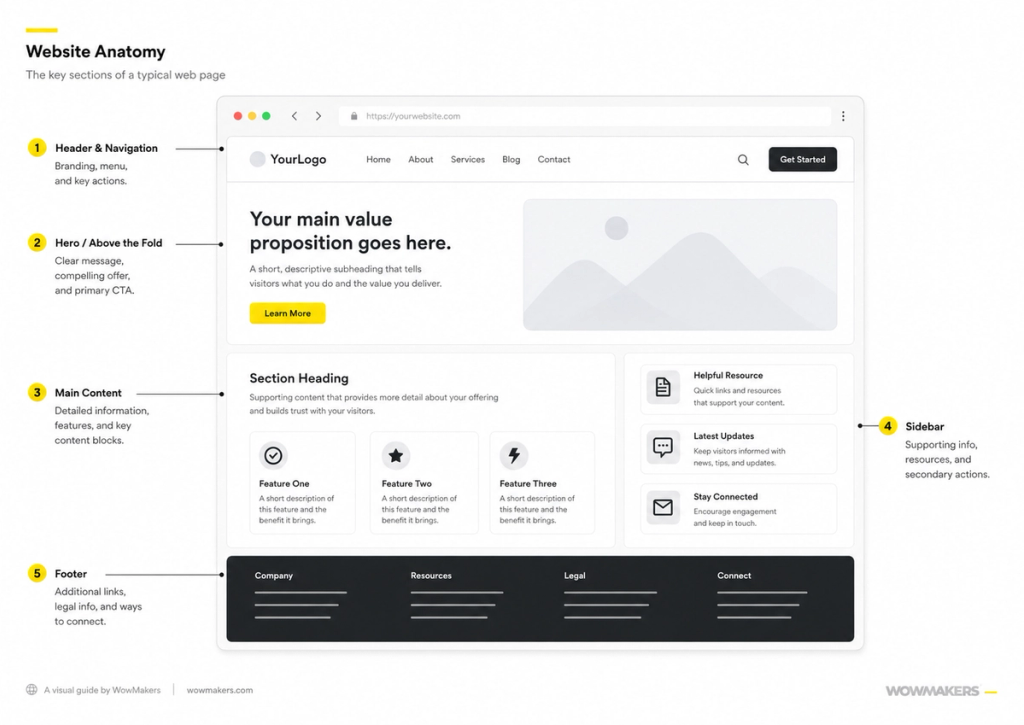
Download the website anatomy diagram (PDF) to keep, print, or share.
The 5 Main Parts of a Website
Most web pages are built from five recognizable regions. Some pages add or drop one depending on their job, but this is the structure visitors expect. Here is what each part does and the key sub-elements you will find inside it.
1. Header and Navigation
The header sits at the very top of the page and stays consistent across the site. It is the first thing people see and the anchor they return to when they want to move somewhere else. Its job is orientation: tell visitors where they are and where they can go.
Key elements in the header include the logo (usually top-left, linking back to the homepage), the navigation menu that lists the main sections of the site, an optional search field, and a primary call-to-action button such as Sign up or Contact. On smaller screens the menu often collapses into a hamburger icon.
2. Hero Section (Above the Fold)
The hero is the large area at the top of the page, visible above the fold before anyone scrolls. It carries the single most important message and sets the tone for everything that follows. On a homepage or landing page, the hero often decides whether someone stays or leaves.
A hero usually contains a clear headline, a supporting subhead that adds context, a primary call-to-action button, and a hero image or background visual. The aim is to communicate what the page offers and what to do next within a few seconds. Typography matters here too, since the right fonts shape a page's personality long before anyone reads a word.
One detail worth flagging: if you use a rotating hero carousel, expect most of it to go unseen. Carousels test poorly in usability research, and most visitors never make it past slide one before scrolling. A single strong message usually does more work than several rotating ones.
3. Main Content (Body)
The main content is the body of the page, the area that does the real work of informing, persuading, or selling. This is where visitors spend most of their time, so it tends to be the longest and most varied region.
Depending on the page, the body can hold reusable layout blocks, feature cards, images, forms, and plenty of internal links that connect readers to related pages. Building the body from a modular set of components keeps a long page consistent and easy to update.
Strong main content rests on a clear content strategy, broken into scannable sections with descriptive subheadings rather than long unbroken blocks. Deciding what each section needs to say before you design it is what keeps the body focused.
4. Sidebar
The sidebar is a narrower column placed beside the main content, most often on blogs, documentation, and news sites. It is optional and increasingly skipped on marketing pages, but it remains a common part of the anatomy of a website where supporting information helps.
Typical sidebar elements include related links, widgets, a category list, and a newsletter signup. In our UX work, we see teams overload the sidebar until it competes with the page it is meant to support. Treat it as optional rather than a catch-all, and only add a sidebar element when it earns its place. Used poorly, it becomes clutter, which is why many modern layouts drop it entirely.
5. Footer
The footer closes the page at the bottom and acts as a catch-all for everything that does not belong in the primary navigation. Visitors who scroll all the way down often arrive there looking for a specific detail, so it earns its place even though it sits last.
Common footer elements include secondary footer navigation, legal links such as privacy policy and terms, contact information, social media links, and a copyright line. The footer is also a useful spot for sitemap-style links that help people and search engines find deeper pages.
Other Essential Website Elements
Beyond the five main regions, a handful of smaller UI elements show up across the whole page. They are the connective tissue of good web design, and you will recognize every one of them.
Favicon
The favicon is the tiny icon that lives in the browser tab and bookmarks list. It is not part of the page layout itself, but it represents the site visually and helps people find the right tab among many.
Breadcrumbs
Breadcrumbs are a small trail of links, usually near the top of the content, that show where the current page sits in the site hierarchy. They help visitors understand the structure and jump back up a level without using the main menu.
Buttons and CTAs
Buttons and calls-to-action are the elements that prompt a specific next step, such as Buy now, Download, or Get a quote. A clear primary CTA in the hero, repeated where it makes sense, is one of the most important parts of a page that converts.
Forms
Forms collect input from visitors, from a simple email field to a multi-step checkout or contact form. Clear labels, sensible field order, and a single obvious submit button keep forms easy to complete.
Slider or Carousel
A slider or carousel rotates through multiple images or messages in one space. It can be useful for showcasing products or testimonials, though many teams now favor a single strong message over rotating content that visitors often miss.
Whitespace
Whitespace is the empty space between elements. It is an active design choice, not wasted room. Generous spacing groups related items, separates unrelated ones, and gives the eye somewhere to rest, which makes a page feel calmer and easier to read.
Hover and Interactive States
Hover and interactive states are the visual responses that elements give when someone points at, taps, or focuses on them, like a button changing color or a link underlining. They are interaction feedback rather than a fixed section of the page, and they tell visitors what is clickable and what just happened.
Under the Hood: How a Website Is Built
The visual parts above are what people see. Beneath them sits the technology that puts those parts on screen. You do not need to write code to understand the anatomy of a website, but knowing the basics makes the whole picture clearer.
Three core languages do most of the work. HTML, CSS, and JavaScript each handle a different layer: HTML provides the structure, marking up the headings, paragraphs, and regions of a page; CSS controls the style, setting the colors, spacing, fonts, and layout; and JavaScript adds behavior, powering things like menus, sliders, and form validation.
Two more pieces make a site reachable. A domain is the address people type, like example.com, and hosting is the server space where the site's files live. When someone visits, a content management system or CMS often assembles the page from stored content, and the web browser downloads the code and renders it into the page you see and interact with.
Information Architecture: How the Parts Connect
Information architecture is how all these parts and pages are organized so people can find what they need. The individual regions matter, but their arrangement across the whole site is what makes a website feel intuitive or confusing. Good information architecture turns a pile of pages into a clear path.
A few principles keep a structure clear:
- Group related pages under logical sections that match how visitors think, not your internal org chart.
- Keep navigation shallow so any page is reachable in a few clicks.
- Use consistent labels in menus, breadcrumbs, and links so the same thing is named the same way everywhere.
- Connect related content with internal links so people and search engines can move between pages naturally.
Ordering matters as much as grouping. On one marketing page we worked on, the proof points sat below a long block of feature copy, and visitors kept bouncing before reaching them. Moving the proof above the features, so the page led with evidence rather than claims, made the same content read as far more credible without adding a single word. The parts were all there. The order was doing the damage.
Tips for a Well-Structured Website
Once you know the parts, a few current practices help them work together. These apply whether you are building from scratch or refining an existing site.
- Design mobile-first and responsive, so the layout adapts cleanly from phone to desktop rather than breaking on small screens.
- Keep navigation clear and predictable, with a focused menu and an obvious way back to the homepage.
- Watch performance and Core Web Vitals, since slow pages lose visitors and rank worse in search.
- Build for accessibility, with readable contrast, alt text on images, and full keyboard support so everyone can use the site.
- Make CTAs clear and specific, so the next step is never in doubt on any page.
- Cover SEO basics, including descriptive titles, sensible headings, and clean internal links that help pages get found.
- Keep content fresh, updating key pages so the information stays accurate and worth ranking.
- Secure the site with HTTPS, which protects visitors and is expected by browsers and search engines alike.
Good UI/UX design ties all of this together, making the structure feel effortless rather than something visitors have to think about.
Key Takeaways
- The anatomy of a website is a visual model first: most pages share the same five main parts in the same order.
- Those parts are the header and navigation, the hero above the fold, the main content body, an optional sidebar, and the footer.
- Supporting elements like the favicon, breadcrumbs, buttons, forms, and whitespace fill and connect those regions.
- Under the hood, HTML, CSS, and JavaScript, plus a domain, hosting, and a CMS, turn the structure into a working site the browser renders.
- Information architecture and clear UX decide whether all those parts add up to a site that is easy to use.
Frequently Asked Questions
What are the main parts of a website?
The main parts of a website are the header and navigation, the hero section above the fold, the main content body, an optional sidebar, and the footer. Each region holds supporting elements such as the logo, menus, buttons, forms, and links.
What are the 5 main components of a website?
The five main components are the header and navigation, the hero section, the main content, the sidebar, and the footer. The sidebar is the most optional of the five and is most common on blogs and content-heavy sites.
What is the difference between a website and a web page?
A web page is a single document with one address, such as a homepage or a blog post. A website is a collection of related web pages grouped under one domain. The anatomy described here applies to a single web page, while information architecture describes how many pages connect into a website.
What is the anatomy of a web page?
The anatomy of a web page is the arrangement of its structural parts from top to bottom: header and navigation, hero, main content, an optional sidebar, and footer. It is the same model as the anatomy of a website, applied to one page rather than the whole site.
Why does the anatomy of a website matter for UX?
It matters because visitors rely on familiar patterns to navigate without thinking. When parts sit where people expect, the site follows the conventions visitors expect from the wider web, the site feels intuitive, and they find what they need faster. When the layout breaks convention without good reason, visitors get confused and leave.
Do AI website builders change the anatomy of a website?
AI website builders change how quickly a site gets made, not the underlying anatomy. They still generate the same recognizable parts, the header, hero, main content, sidebar, and footer, because those conventions are what visitors expect. AI speeds up production, while human judgment still decides the structure, story, and which choices are worth keeping.