Modular web design is a way of building websites from reusable, self-contained blocks instead of designing every page from scratch. Each block, or module, is a complete unit of layout and content that can be rearranged, reused, and updated independently. It is the same thinking behind a well-run design system, applied to how a whole site is assembled.
For growing businesses, this matters. A modular site is faster to launch, cheaper to maintain, and far easier to scale than a traditional page-by-page build. As content needs change, you add or rearrange modules rather than rebuilding pages, which keeps the site consistent and current without a full redesign every couple of years.
This guide covers what modular web design is, how it differs from the traditional approach, how it works in practice, real examples, the benefits and the challenges, when to use it, and how AI is changing the way modular sites get built.
- What is modular web design?
- Modular vs. traditional web design
- How modular web design works
- Modular website design examples
- The benefits of modular web design
- The challenges to plan for
- When modular web design is the right choice
- How to build a modular website
- Modular web design in the age of AI
- Frequently asked questions
What is modular web design?
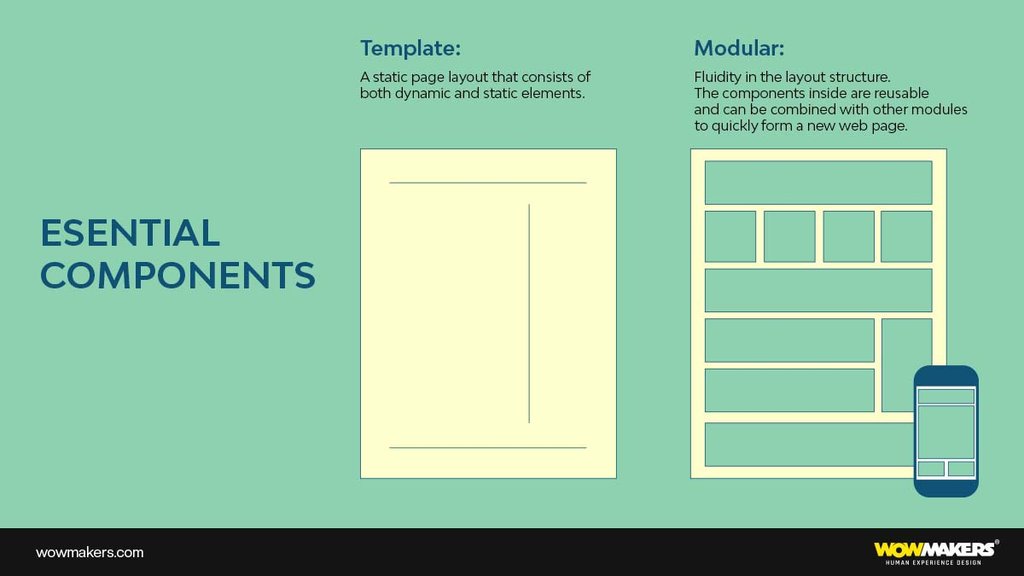
Modular web design is an approach to building websites using a system of scalable, repeatable components and patterns. Instead of treating every page as a one-off, you create a library of modules, such as headers, hero sections, feature grids, testimonial blocks, pricing tables, and calls to action, and assemble pages by combining them. Each module is designed once and reused everywhere it fits.
Think of it like building with blocks. A single set of well-made modules can produce dozens of different pages, and when you update a module, every page that uses it updates with it. This gives you control over how pages are organized while keeping the whole site visually and functionally consistent. For larger businesses especially, it saves significant time and effort over building and styling each page by hand.
The term website modules simply refers to these building blocks. A module can be as small as a button component or as large as a full page section. What makes the design modular is that these units are independent and reusable, not locked to a single page.
Modular web design vs. traditional web design
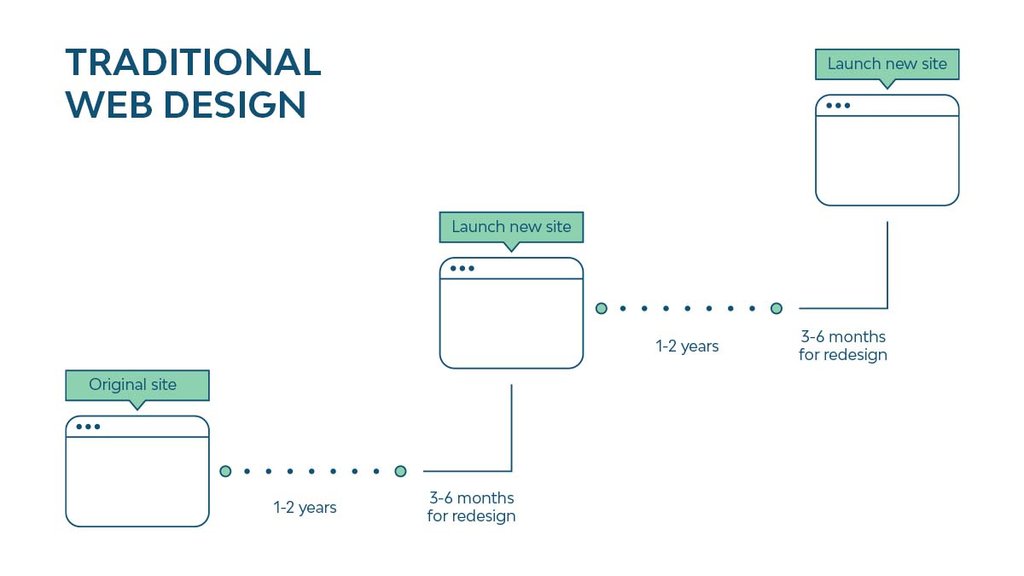
The traditional web development process builds a site page by page as a largely fixed product. A typical project runs three to six months from brief to launch, and because so much is custom-built, a small design or content change can ripple into unexpected problems elsewhere. By the time the site ships, the content or technology behind it can already feel dated, and the only real fix is another long redesign cycle.
Modular web design replaces that with a continuous, component-based model. You build a kit of reusable parts once, then compose and recompose pages from them. The differences show up across the whole lifecycle of the site:
- Speed: new pages are assembled from existing modules in hours, not built from scratch over weeks.
- Consistency: shared modules guarantee the same look, spacing, and behavior across every page automatically.
- Maintenance: you update a module once and the change propagates everywhere it is used, instead of editing pages one by one.
- Cost: once the reusable components exist, a full redesign is rarely necessary. You evolve the system instead of rebuilding it.
- Scalability: adding a new section or campaign page is a low-risk, repeatable task rather than a custom project.
How modular web design works
Modular web design works by separating a website into independent layers: the design system that defines the rules, the modules that follow those rules, and the pages that assemble the modules. Each layer has a clear job, which is what keeps a large site coherent.
At the foundation sit your design tokens and standards, the colors, typography, spacing, and interaction patterns that every component must respect. Web design modules are then built on top of that foundation, so a button, a card, or a pricing table all share the same visual language no matter where they appear. Pages become a layer of composition, where you choose and order modules to tell a particular story.
A clear example is the pillar page. A pillar page acts as the index for a topic cluster on your site, and it is naturally modular: its hero, section blocks, related-content grids, and calls to action are all reusable modules drawn from the same library used elsewhere. Build the modules well once, and pillar pages, landing pages, and product pages all become fast to produce and consistent by default.
Modular website design examples
The clearest modular website design examples are the design systems that large product companies publish and build on. Each is a living library of reusable modules and rules that powers hundreds of pages and screens.
- Google's Material Design and IBM's Carbon Design System define components, spacing, and behavior that teams assemble into countless interfaces, all visibly consistent because they share the same modules.
- Shopify's Polaris and Atlassian's Design System let large product and marketing teams ship new pages quickly by composing pre-built, governed components rather than designing each screen from scratch.
- Modular CMS platforms such as HubSpot and Webflow expose this approach directly to marketers, who build pages by dragging in reusable sections and blocks instead of touching layout code.
You also see modular design in everyday marketing sites. A typical SaaS homepage is a stack of modules, hero, logo strip, feature grid, testimonial, pricing, FAQ, and CTA, and the same blocks reappear, restyled, across the product, pricing, and landing pages. That repetition is not laziness. It is a deliberate system that makes the site faster to build and easier for visitors to navigate because patterns stay predictable.
The benefits of modular web design
The benefits of modular web design come down to one idea: design the hard parts once, then reuse them. That single shift improves how fast you ship, how much you spend, and how well the site holds together over time.
Room to grow
New needs keep emerging, whether that means adding content, launching a campaign, or opening a new product line. A modular site absorbs that growth gracefully. You add or recombine modules to create new pages without disturbing what already works.
Faster launches
Because the components already exist, spinning up a new page is mostly assembly. A modular architecture lets you get pages live quickly and adapt them on the fly, which is invaluable when marketing needs a landing page this week, not next quarter.
Easier maintenance
Modules can be tested and adjusted in isolation, and a change to one module updates everywhere it appears. Adding fresh content or refining a section no longer means reworking a whole page, so the site stays current with far less effort.
Lower cost over time
Once the reusable components are established, a complete redesign is rarely necessary. Instead of rebuilding from zero every few years, you evolve the existing system, which keeps long-term design and development costs down.
Built-in consistency
Shared modules enforce the same look and behavior across the whole site automatically. That consistency strengthens your brand and makes the experience more predictable and trustworthy for users, with no manual policing required.
The challenges to plan for
Modular web design is powerful, but it is not effortless. Knowing the trade-offs up front is what separates a clean modular system from a messy one.
It needs planning before payoff
The value of a modular system arrives later, once the library exists. The upfront work of defining standards and building the first set of components is real, and teams that expect instant results can find the early stage daunting. The investment pays back across every page that follows.
Over-modularization
Pages built from too many tiny components can become fragmented and hard to manage. If every element is its own module, assembling a page turns into a juggling act. The skill is choosing the right granularity, modules large enough to be meaningful, small enough to reuse.
Keeping content consistent
Because modules reappear across the site, making the experience feel consistent everywhere takes discipline, especially with visual media. It is not always obvious which version of a component or asset is current, so clear ownership and a single source of truth matter.
When modular web design is the right choice
Modular web design is most effective for products and sites that need flexibility, scalability, and consistency at the same time. If your website is going to grow, change often, or span many pages that share a visual language, a modular foundation is almost always the right call.
- Larger businesses with many pages, where consistency and maintenance are real costs.
- Fast-moving teams that launch campaigns, landing pages, and content regularly.
- Products and platforms expected to expand, where today's site is only the starting point.
- Any organization that wants a durable web presence without committing to a full redesign every few years.
For a tiny brochure site that will never change, the overhead may not be worth it. For nearly everything else, building modular pays for itself quickly.
How to build a modular website
Building a modular website is mostly about discipline early on. A few principles keep the system clean as it grows.
- Plan the system first. Map your content and the page types you will need, then decide what the core modules are before you start designing pages. The plan is what prevents a sprawl of one-off components later.
- Be consistent in your visual components. Reusing the same well-made modules cuts production time and keeps the whole site coherent. Consistency is the entire point of going modular.
- Add components with purpose. Every new module should earn its place. Before creating one, ask whether an existing module can do the job, and only add a new one when it answers a clear need.
- Leave room for creativity. A modular system is a foundation, not a cage. Sometimes a bespoke page beats one assembled from stock parts, so keep space for custom work where it counts.
- Design for scalability. Plan for growth from the start so the system can absorb new content and page types without strain.
- Make it responsive. Every module should adapt cleanly across screen sizes, so pages built from them work on any device by default.
Modular web design in the age of AI
AI has made modular web design more powerful, not less relevant. Modular systems and AI fit together naturally: a well-defined library of components and design tokens gives AI tools clean, governed parts to work with, which is exactly what they need to generate and assemble pages reliably.
Teams now use AI to draft new module variations, suggest layouts from an existing component library, and stand up page mockups in minutes for review. Because the modules already encode the brand's rules, the output stays on-system instead of drifting. What does not change is the judgment layer. Deciding which modules a brand needs, where a bespoke page beats an assembled one, and whether a layout actually serves the visitor still belongs to designers. Used well, AI amplifies a modular system; it does not replace the thinking that makes the system good in the first place.
Frequently asked questions about modular web design
What are modules in a website?
Website modules are self-contained, reusable building blocks of a page, such as navigation menus, hero sections, feature grids, image galleries, forms, testimonial blocks, and calls to action. Each module bundles its own layout and content and can be reused across pages, so you assemble pages by combining modules rather than designing each one from scratch.
What is the difference between modular and traditional web design?
Traditional web design builds a site page by page as a mostly fixed product, which is slow to launch and costly to change. Modular web design builds a library of reusable components first, then assembles pages from them. The result is faster launches, automatic consistency, easier maintenance, and lower long-term cost, because updating one module updates every page that uses it.
Is modular web design good for SEO?
Yes. Reusing well-built modules keeps page structure, internal linking, and load behavior consistent across the site, which helps both crawlers and users. Modular pillar pages and topic clusters are also easier to build and interlink, and consistent, fast-loading components support the page experience signals search engines reward.
When should you use modular web design?
Use modular web design when your site will grow, change often, or span many pages that share a visual language, which covers most business and product websites. It is especially valuable for larger sites and fast-moving marketing teams. For a tiny static site that will never change, the upfront setup may not be worth it.
Build on a modular foundation
Modular web design gives you both freedom and structure. You get the creative range to build distinctive pages and the underlying system that keeps them consistent, fast to ship, and cheap to maintain. It asks for organization and planning up front, and it rewards that with a website that grows with your business instead of being rebuilt against it. For most growing companies, that trade is an easy one to make.
At WowMakers, we have spent 15 years building brands, products, and the design systems behind them, now with AI-amplified workflows that let us design and ship modular sites faster without trading craft. If you are planning a website that needs to scale, take a look at our UI/UX and web design work.