Plenty of product roadmaps have “add AI” on them somewhere, often as one line with no plan behind it. Where does it go? How far should it go? Put in the right place, AI makes a product feel more personal and quicker to use, and people notice. That's where satisfaction and growth come from. SAMR is a useful framework to plan it.
What is the SAMR Framework?
SAMR stands for Substitution, Augmentation, Modification and Redefinition. Dr. Ruben Puentedura developed it for educational technology, as a way to judge how much a new tool really changes a lesson. We like it for product work because it asks AI the same blunt question: is this changing anything, or just doing the old thing a new way?
Each level is a bigger change than the one before. Take any AI idea on the table, give it a level, and you can argue about priorities with something firmer than gut feel.
Substitution: AI does a job that used to be done another way, and the job itself stays the same. This is the simplest kind of integration.
Augmentation: AI still does the old job, but does it better.
Modification: AI changes how an existing function works, and the improvement is large.
Redefinition: AI makes something possible that couldn't be done before, and the product gains abilities it never had.
It's tempting to jump straight to redefinition. Starting lower is less glamorous, and it's how you learn what your users will accept before you bet big. Each step should leave the product more useful to customers.



Take a look at our case study
Substitution: AI as a Direct Replacement
Substitution is the entry level. AI takes over a task the product already does. Same task, same result, less manual effort, and often no person in the loop at all.
Customer email is the easy example. Someone used to write every reply by hand. Now an AI system suggests one, or just sends it. The old process is out, the AI-powered one is in, and the job hasn't changed: you're still answering customers. It's quicker and far less tedious. That is the point of substitution: a familiar task, done with less effort.
Examples:
Apple Siri: Setting reminders, sending messages and searching the web used to mean tapping through screens. Now a voice command does it.
Gmail Smart Replies: Gmail reads the email and offers a few short replies, so you don't have to type out the routine ones.
YouTube Auto-Captions: Nobody has to add subtitles by hand. AI writes them, and videos become accessible with no extra work.
Spotify Music Curation: AI builds playlists from what you already listen to, so finding new music takes almost no effort.
Google Translate: Instead of translating by hand, you get an instant AI translation, which makes talking across languages much easier.
Guidelines for Substitution:
- Identify repetitive tasks: Look for the routine work people repeat all day, the kind that eats time and budget. That's where AI can take over.
- Evaluate efficiency gains: The swap only counts if it's faster and the quality holds. You want the same output with less effort.
- Maintain simplicity: The AI version should be as easy to use as the old one. If users need training or support to cope with it, something went wrong.
Augmentation: AI for Functional Improvements
Augmentation comes next. The original feature is still there, but AI makes it better and more useful to the person using it.
The streaming service that recommends what to watch next is the textbook case. It reads your viewing history and does something the old catalogue page never could. Browsing is still there. It's just better, and people stick around longer.
Examples:
Netflix Recommendations: suggestions based on what you've already watched. Finding the next show gets easier.
Instagram Filters: AI suggests the filters that suit a particular photo. A plain feature becomes a smart editing tool.
Google Photos: AI recognises people, places and things in your photos, so searching for one specific picture actually works.
LinkedIn Job Suggestions: AI reads your profile and job preferences and suggests openings that fit, which makes job hunting less of a slog.
Google Maps Traffic: AI predicts traffic and suggests faster routes, so the same navigation feature becomes far more useful.
Guidelines for Augmentation:
- Enhance high-use features: Start with the features people use most, and ask how AI could make them smoother or more personal.
- Add predictive capabilities: Use AI to predict what users need and offer recommendations or adjustments before they ask.
- Iterative implementation: Release improvements in small steps. Collect user feedback after each one and use it to tune the AI until it does what users need.
Modification: AI for Significant Redesign
Modification is where the feature itself gets rebuilt. Augmentation adds to a process. Modification redesigns it around what AI does well, and when it works, the jump in quality is obvious.
Think about analysis. AI can go through datasets far too large for a person and surface insights nobody could reach before. That changes how decisions get made. It's harder work than the first two levels. Done right, it improves the user experience and how the business runs, by a wide margin.
Examples:
Grammarly Advanced Writing Insights: still catches spelling and grammar, then goes further with notes on clarity, tone and engagement. Closer to an editor than a spell-check.
Adobe Photoshop Neural Filters: change a face's expression or age, or move the style of one image onto another. A lot more room to experiment.
Facebook Ads: AI decides who sees an ad based on user behaviour and preferences, so campaigns are better targeted and work harder.
Google Assistant: understands context and answers in conversation, instead of matching keywords.
Guidelines for Modification:
- Redesign key workflows: Find the core functions where AI could make a big difference to how well and how quickly they work. This may mean rethinking, from the ground up, how people use the product.
- Prioritize high-impact areas: Put your effort where it will matter most to user satisfaction and to how useful the product is. High-traffic features and the functions people use most are good places to start.
- Test thoroughly: Make sure the new AI process is solid and easy to use before you roll it out fully. User testing and feedback matter most at this stage, because that's how you refine the redesign.
Redefinition: AI for Creating the Inconceivable
Redefinition is the top rung. AI makes features possible that simply weren't before: real-time language tutoring, cars that drive themselves in some conditions, and assistants that hold a real conversation. They change how people use a product, and they give you something competitors don't have.
Examples:
Duolingo Language Learning: a learning path that adjusts in real time to how you're doing.
Tesla Autopilot: driver-assistance AI steers, changes lanes and parks in supported conditions, while the driver stays responsible.
Google Maps AR Navigation: AI and AR put directions on screen, on top of the live view of your surroundings, so you can see which way to go.
ChatGPT: conversation that sounds human. Customer service, content writing and personal assistance all work differently because of it.
Guidelines for Redefinition:
- Innovate boldly: Look for places where AI could do something your product never could. Don't limit yourself to polishing what's already there.
- Focus on user experience: A new capability has to be worth something to users. It should solve a real problem or give people a new experience they'll actually use.
- Keep up with the technology: AI moves fast, so follow new releases to see what's newly possible. Work with AI specialists, or put money into R&D, to explore it properly.

Planning where AI fits in your product? Talk to our UX team.
Talk to a UX expert
Embracing AI with the SAMR Framework
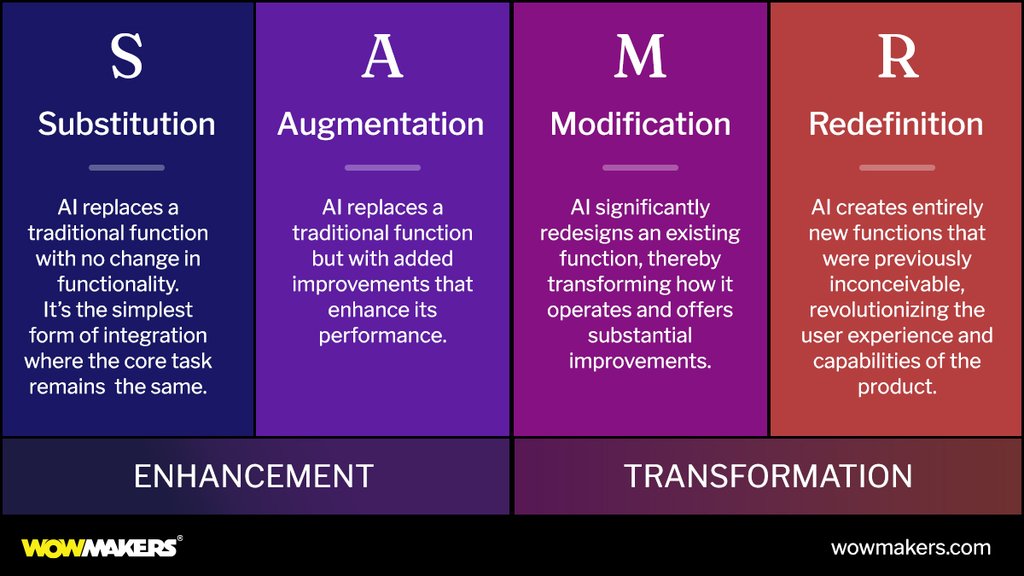
SAMR won't tell you what to build. What it does is turn a vague “add AI” into a sequence you can work through. When AI lands in the right place, the product gets quicker and easier to use, and customers are happier for it.
A practical first pass: list your current features, give each one a SAMR level, then circle the two or three where AI would make the biggest difference. The answer may be a small substitution or a full redefinition, and either can be the right place to start.
Start where AI helps users most, then build from there.
For the wider picture, read how AI is changing user experience design, or see our UI/UX design services.
SAMR framework FAQ
What does SAMR stand for?
Substitution, Augmentation, Modification and Redefinition: four levels that describe how much a new technology changes a task, from doing the same job a new way to making something new possible.
Who created the SAMR model?
Ruben Puentedura, an education technology researcher, who built it to judge how much a technology changes teaching and learning.
Can SAMR be used outside education?
Yes. Product teams can use the same four levels to sort AI ideas by how much they change a feature, from a simple swap to a capability the product never had.
Which SAMR level should a product start at?
Usually substitution or augmentation. They cost less to build and show what users will accept, before you invest in modification or redefinition.
Planning AI features for your product's UX? Talk to us and we'll help you work out where to start.